02 | Claude Code in 16 Hours: Installation, API Access, Third-Party Models, and Coding Plan
Prepare installation, access, and model selection, then use Coding Plan to set reviewable boundaries for complex changes.
02 · Installation and use
Let’s talk about a common embarrassment. Many people install Claude Code for the first time. They search for an old tutorial and type npm install -g @anthropic-ai/claude-code according to the instructions. However, they get stuck on the permission error. When I was anxious, I directly used sudo to install it - it was installed, but the subsequent automatic updates failed every day, and claude doctor was all red. After struggling for almost an hour, I realized: Officially, native scripts have been listed as the first choice, and the npm path has more pitfalls. One line of curl script can do something in thirty seconds, but it has taken the most roundabout and easiest way to get into trouble.
To put it bluntly, installing Claude Code itself is not difficult. The difficulty is that no one tells you which path is a trap. This article will clearly mark the right path for each platform so that you don’t make the same mistakes again.
After reading this article, you will get:
- One command to install Claude Code on Mac / Windows / Linux / WSL (with expected output, you can verify whether the installation is successful or not)
- Comparison of three installation methods (official script / package manager / npm) to know which one you should choose
- Complete operations of login, upgrade and uninstall
- A cheat sheet for “Reporting Error → How to Fix”, covering 90% of the pitfalls that novices will run into
01 Figure out three things before installing
Don’t rush to give orders. Too many people only realize halfway through pretending, “Oh, this account can’t be used yet.” It’s all in vain. Check three things first.
The first thing: Is your computer qualified?
Claude Code does not have high machine requirements, but there are a few hard lines (subject to official):
| Projects | Requirements |
|---|---|
| Operating system | macOS 13.0+ / Windows 10 1809+ / Ubuntu 20.04+ / Debian 10+ / Alpine 3.19+ |
| RAM | 4GB+ available RAM |
| Processor | x64 or ARM64 |
| Network | Internet connection required |
| Terminal | Bash, Zsh, PowerShell or CMD any |
Note for macOS lower than 13.0: It can be installed, but it will crash when running, and errors such as dyld: cannot load will be reported - the old system does not support binary instructions, there is no way around it, you can only upgrade the system (on a machine that is still stuck on macOS 12, it will not run alive, so upgrade to 14).
The second thing: you must have an account that can be used
**One thing that newbies most easily overlook: the free version of Claude.ai account cannot use Claude Code. **
The official requirement is one of Pro, Max, Team, Enterprise or Console (API) account. Just because you usually have a great time chatting with the web version of Claude, it doesn’t mean that your account can drive Claude Code—the free version just doesn’t work.
If you want to save money by using domestic models (DeepSeek, GLM, Minimax), leave the account step aside for now. Chapter 05 is dedicated to connecting to third-party models. This article defaults to using the official account.
Item 3: Where are you going to use it?
Claude Code has three usages: CLI (Command Line) has the most complete functions and is closest to the original design intention; Desktop App can be downloaded and used without touching the terminal; Editor Integration (VS Code / JetBrains) integrates into the existing development flow.
**My suggestion: just learn CLI. ** This article also takes CLI as the main line - it is the most stable and versatile, and it only takes a few minutes to learn the desktop apps and editor plug-ins behind it (will be discussed in Chapter 08-10). If you are really against the terminal, go to https://claude.com/download and download the desktop app, and you can use it with just a few clicks.
💡 In one sentence: Confirm three things before starting the installation - The system version is sufficient, the account is a paid file or Console, and the usage is CLI. After passing these three levels, type the command.
02 Install it: One command per platform
Let me give the conclusion first: All platforms give priority to using the official installation script (officially called “Native Install/Native Install”, which is now the most recommended). The biggest advantage is - it will automatically update in the background after installation, so you basically don’t have to worry about the version.
**Analogy: Native installation is like installing an app from the App Store. ** Click “Install”, it downloads, installs and updates itself in the background; the old npm method is more like “manually click next for the next installation package” - it can be installed, but the update requires you to do it yourself, and it is easy to go wrong due to permissions.
macOS / Linux / WSL
Open a terminal and paste this line:
curl -fsSL https://claude.ai/install.sh | bashDomestic network tips: claude.ai and download server downloads.claude.ai require Magic Internet Access in most cases for stable access. Hanging up the agent during installation can save most of the “stuck/timeout” errors.
Windows (native, without WSL)
Confirm which terminal you are in first - This is the most common mistake for Windows users. PowerShell and CMD commands are different:
PowerShell (the prompt looks like this PS C:\>):
irm https://claude.ai/install.ps1 | iexCMD (the prompt is C:\>, without the preceding PS):
curl -fsSL https://claude.ai/install.cmd -o install.cmd && install.cmd && del install.cmd**How to tell? ** Check if there is PS at the beginning of the prompt: if it is, it means PowerShell, if not, it is CMD. If you run CMD in PowerShell, the command with && will report The token '&&' is not a valid statement separator. On the other hand, if you run irm in CMD, it will report 'irm' is not recognized - just change the corresponding command when you see these two errors.
**When turning on the magic to surf the Internet, the CMD still freezes/times out? ** This is a real pitfall: the default “system proxy” mode of most proxy clients does not recognize curl in CMD at all - it does not read the system proxy settings of Windows and still connects directly, so if the proxy is turned on, it means it is not turned on. Before installation, manually set the proxy in the same CMD window (replace 7890 with the actual HTTP port of your proxy client, which can be seen in the client settings):
set http_proxy=http://127.0.0.1:7890
set https_proxy=http://127.0.0.1:7890
After setting up, run the installation command above. If you find it troublesome, there are two ways: change PowerShell and run the irm one (it uses the system proxy by default, which does not have this problem), or turn on TUN mode in the proxy client (some call it “enhanced mode” or “virtual network card”), so that all traffic is forced to pass through the proxy.
In addition, it is recommended to install Git for Windows** in the native Windows environment, which provides Git Bash for Claude Code; if not installed, PowerShell will be used to run commands (it can also be used, but some Bash scripts are limited). WSL doesn’t require it.
Should I choose WSL or native for Windows?
If you are doing Linux tool chain development or want to use the sandbox function, go to WSL. Official comparison table:
| Options | What’s needed | Sandbox support | When to use |
|---|---|---|---|
| Native Windows | Use nothing (Git for Windows optional) | ❌ | Windows native projects and tools |
| WSL 2 | Enable WSL 2 | ✅ | Linux toolchain may require sandboxing |
| WSL 1 | Enable WSL 1 | ❌ | Fallback when WSL 2 is no longer available |
If you use WSL, just run the macOS/Linux curl script above in the WSL terminal - it is installed in WSL, not in PowerShell.
Don’t want to touch the terminal? There is another way
In addition to the official script, there are several alternative paths. Make a comparison and choose according to your needs:
| How to install | Commands | Automatic updates | My suggestions |
|---|---|---|---|
| Official script | curl ... | bash | ✅ Automatic background | Preferred, worry-free |
| Homebrew (macOS) | brew install --cask claude-code | ❌ Manual | People who have heavily used brew to manage software |
| WinGet (Windows) | winget install Anthropic.ClaudeCode | ❌ Manually | People who are used to using WinGet |
| npm | npm install -g @anthropic-ai/claude-code | ❌ Manual | Consider it last, you must install Node.js 18+ first |
A few pitfalls to mention in advance:
- Homebrew has two cask:
claude-codeis the stable version (one week slower and skips versions with major regressions),claude-code@latestis the latest version, and the upgrades correspond tobrew upgrade claude-code/brew upgrade claude-code@latest. - WinGet does not update automatically: You need to manually run
winget upgrade Anthropic.ClaudeCoderegularly. - npm Never add
sudo. The official warning is clear thatsudo npm install -gwill cause permission issues and security risks - this is the most common pitfall at the beginning. When encountering permission errors, the correct solution is to use the official script instead. You should also usenpm install -g ...@latestwhen upgrading npm. Do not usenpm update -g.
💡 In one sentence: Just choose the official script with your eyes closed. One
curl(orirmin Windows) can solve the battle, and it also comes with background updates; npm is the last resort, and never usesudo.
03 Verify whether the installation is successful or not
Don’t rush to use it after installing it, take ten seconds to confirm. Open a new terminal window and type:
claude --versionThe expected output is a version number, something like this (the number you see will update, normal):
2.1.81 (Claude Code)**See version number = installation successful. ** If it reports command not found: claude or 'claude' is not recognized on Windows, do not reinstall it yet - 90% of the time it is because the PATH is not configured properly (the installation directory is not included in the system search path), there is a fix in Section 06.
For more details, the official also issued a physical examination order:
claude doctorIt will list the installation status, configuration, and latest update results. After installing a new machine or encountering convulsions, the first reaction should be to run claude doctor - it is much faster than guessing by yourself.
💡 In one sentence:
claude --versionpublishes the version number; if anything goes wrong,claude doctoris your first diagnostic tool.
04 Login: Let it recognize you
The installed Claude Code is still an empty shell that “doesn’t know you”. You have to log in and bind an account to work. Start it in your project directory:
claudeIt will automatically guide you to log in when you start it for the first time, or you can trigger it manually after entering the interface:
/loginNext, it pops up a browser page for you to authorize. After authorizing, you return to the terminal and log in. The credentials are stored locally, so you don’t need to log in again when starting next time. Just change the account and run /login again.
What should I do if my login is stuck?
The most common one: The browser does not pop up automatically, or you log in to the remote server/WSL/SSH - the browser may be opened on another machine and the callback cannot be returned. The official method is very simple:
Press c on the login prompt interface, copy the OAuth (open authorization) URL, manually paste it into the browser and open it. After logging in, a code will be displayed, and then paste the code back to the terminal.
It is easy to suffer this disadvantage when configuring Claude Code on a cloud server. Waiting for a long time for the browser pop-up window to fail to respond - in the remote environment, you have to take the path of “copying the URL and opening it manually”. If even pasting doesn’t work, there is a more stable retreat command:
claude auth loginIt reads the code you paste from the standard input, and is designed to handle terminals where interactive prompts cannot be pasted.
A hidden login pit
After logging in, it reports This organization has been disabled, but the subscription is obviously good - most likely there is an old ANTHROPIC_API_KEY** left in the shell configuration, which has destroyed your subscription credentials.
When there is an API key in the environment variable, Claude Code will give priority to using the key instead of the subscription. The solution is to clear it:
unset ANTHROPIC_API_KEY
claude
For a permanent solution, go to ~/.zshrc, ~/.bashrc or ~/.profile and delete the line export ANTHROPIC_API_KEY=.... After entering Claude Code, you can use /status to confirm which login method is currently used.
💡 In one sentence:
claudewill automatically guide you to log in when it is started. For remote/WSL environments, remember to “presscto copy the URL and open it manually”; if the login report is disabled, first check whether there are any old API keys left in the environment variables.
05 Upgrade and Uninstall
Upgrade
You don’t need to do anything to install it with the official script - it will automatically update in the background, and the next time you start it, it will be the new version. Want to update immediately:
claude updateWhether the update is successful or not, it’s still the same claude doctor. The update channel is optional (written in settings.json, or set in /config in Claude Code):
{
  "autoUpdatesChannel": "stable"
}"latest"(default): get new features as soon as they are released"stable": Use the version about a week ago and skip releases with major regressions - Choose this if you are pursuing stability
If you don’t want automatic updates, just set "DISABLE_AUTOUPDATER": "1" in env of settings.json (it only stops background checking, claude update manual updates can still be used). Homebrew/WinGet/apt installations do not automatically update by default, you must manually run the corresponding upgrade command (as mentioned in the previous pit tip).
Uninstall
Uninstall according to your original installation method. Official script installed:
macOS / Linux / WSL:
rm -f ~/.local/bin/claude
rm -rf ~/.local/share/claude
Windows PowerShell:
Remove-Item -Path "$env:USERPROFILE\.local\bin\claude.exe" -Force
Remove-Item -Path "$env:USERPROFILE\.local\share\claude" -Recurse -Force
Other methods correspond to each other: Homebrew uses brew uninstall --cask claude-code, WinGet uses winget uninstall Anthropic.ClaudeCode, and npm uses npm uninstall -g @anthropic-ai/claude-code.
Note: The above only deletes the program itself, and the configuration, authorization, and session history remain in ~/.claude/. If claude can still run after uninstalling it, it is probably because you have a shell alias left by a second installation or an old version (Section 06 teaches you how to find out).
Want to clean it completely (This step is not recoverable, settings/authorization/MCP configuration/session history are all gone):
# 全局用户设置和状态
rm -rf ~/.claude
rm ~/.claude.json

# 当前项目的本地设置(在项目目录里执行)
rm -rf .claude
rm -f .mcp.json
Reminder: VS Code extensions, JetBrains plug-ins, and desktop apps will also write things to ~/.claude/, and they will be rebuilt if they still contain this directory - to completely delete them, you must uninstall them first.
💡 In one sentence: The upgrade installed by the official script is automatically prompted by the background and manually by
claude update; the uninstallation corresponds to the original installation method, and the configuration file must be deleted separately, and the deletion is irreversible.
06 Error reporting quick check: 90% of the pitfalls that novices will run into
It is basically impossible to escape the error when installing this thing, but most of them have standard solutions. Organize the most frequent categories in the official documents into a quick check list - Treat the symptoms first, then prescribe the medicine, don’t reinstall as soon as an error is reported.
| The error you saw | The real reason | How to fix it |
|---|---|---|
command not found: claude | The installation directory is not in PATH | Add ~/.local/bin to PATH (see below) |
syntax error near unexpected token '<' | The installation script returned HTML instead of a script | Mostly a network/region problem, change to Homebrew/WinGet or try again later |
irm is not recognized | You ran the PowerShell command in CMD | Change to the CMD installation command, or open PowerShell |
'&&' is not valid | You ran the CMD command in PowerShell | Replace it with the irm command of PowerShell |
bash is not recognized | Ran the Mac/Linux command on Windows | Replaced with the irm command of PowerShell |
| Turn on Magic Internet, but the installation in CMD is still stuck/timed out | CMD’s curl does not go through the system proxy, which is equivalent to direct connection | In CMD, first set https_proxy=... and then install (see Section 02), or change PowerShell / turn on TUN mode |
Killed during Linux installation | Not enough memory (OOM kills the process) | Add swap space (see below), Claude Code requires 4GB+ RAM |
Error loading shared library | The installer misjudged the system libc type and pulled the wrong variant | See official musl/glibc troubleshooting |
403 Forbidden after logging in | Invalid subscription/account has no permissions | Check the subscription status, or confirm that the Console account has the corresponding role |
App unavailable in region | Not supported in your region | See Supported Countries |
Pick the two most frequent ones and expand on them.
Pitfall 1: command not found: claude (the most common)
When I run claude, it says that the command cannot be found - it’s not that it’s not installed, it’s that the installed directory is not in the system search path (PATH)**.
**Analogy: PATH is the system’s house number list. ** The program is better installed than the house is built, but the system will only search for addresses registered in the “House Number List” one by one. claude’s house is built at ~/.local/bin/. This address is not registered in the list, so naturally it cannot be found.
Modification method (macOS default is Zsh):
echo 'export PATH="$HOME/.local/bin:$PATH"' >> ~/.zshrc
source ~/.zshrc
Most Linux defaults to Bash, just replace ~/.zshrc with ~/.bashrc. Verification after modification:
claude --versionThe release number is fixed. Windows users add %USERPROFILE%\.local\bin to the user PATH environment variable, and then restart the terminal.
Pit 2: Uncover multiple installations of “Fight”
If you install it with npm first and then install it with the official script, there may be several claudes at the same time, and the versions are inconsistent and the behavior is weird. Let’s first take a look at the ones on PATH:
which -a claudeIf there is more than one listed, only keep the official script (~/.local/bin/claude), and delete the rest:
# 卸掉 npm 全局安装
npm uninstall -g @anthropic-ai/claude-code

# 删掉老版本的本地 npm 安装
rm -rf ~/.claude/local
Many times when you run which -a claude, you will find that npm and native are each installed. Delete the npm one, straighten out the PATH, and you will be instantly quiet.
💡 Summary in one sentence: If an error is reported, check the table first to determine the cause, and don’t reflexively reinstall; if the command cannot be found, it is probably PATH, and if it behaves strangely, it is probably because there are several pretending to be fighting. You can tell by looking at
which -a claude.
07 Hands-on: Run from scratch for the first time
Just installing it doesn’t count, you need to actually run it to confirm that the link is working. **This minimal process does not depend on existing projects and can be done by creating a new empty directory. **
The first step is to create a test directory, enter it, and start Claude Code:
mkdir claude-test && cd claude-test
claude
The first startup will guide you to log in (follow Section 04 to complete). After logging in, you will see the welcome interface.
The second step is to type /help in the input box to see what commands are available:
/helpExpected: A list of available commands and function descriptions pops up. Just type / and automatic completion of all commands will pop up.
The third step is to let it do something practical - give instructions directly in vernacular (no need to remember the command format):
在 test.py 文件里写一个打印 hello world 的函数Expected behavior: Claude Code will first show you the code to be changed as a diff (difference comparison), and wait for your confirmation (select yes) before actually writing the file. This is its core workflow - give the plan first, wait for your approval, and then take action, without secretly changing your stuff.
After confirmation, there will be an additional test.py in the directory. Exit:
exitAt this point, you have completely gone through the entire process of “install → log in → give instructions → it changes files → you confirm”. The first time I saw it write the code by itself and stop and wait for you to nod, I felt like “this thing can really work” - When I ran it through for the first time, I was a little excited.
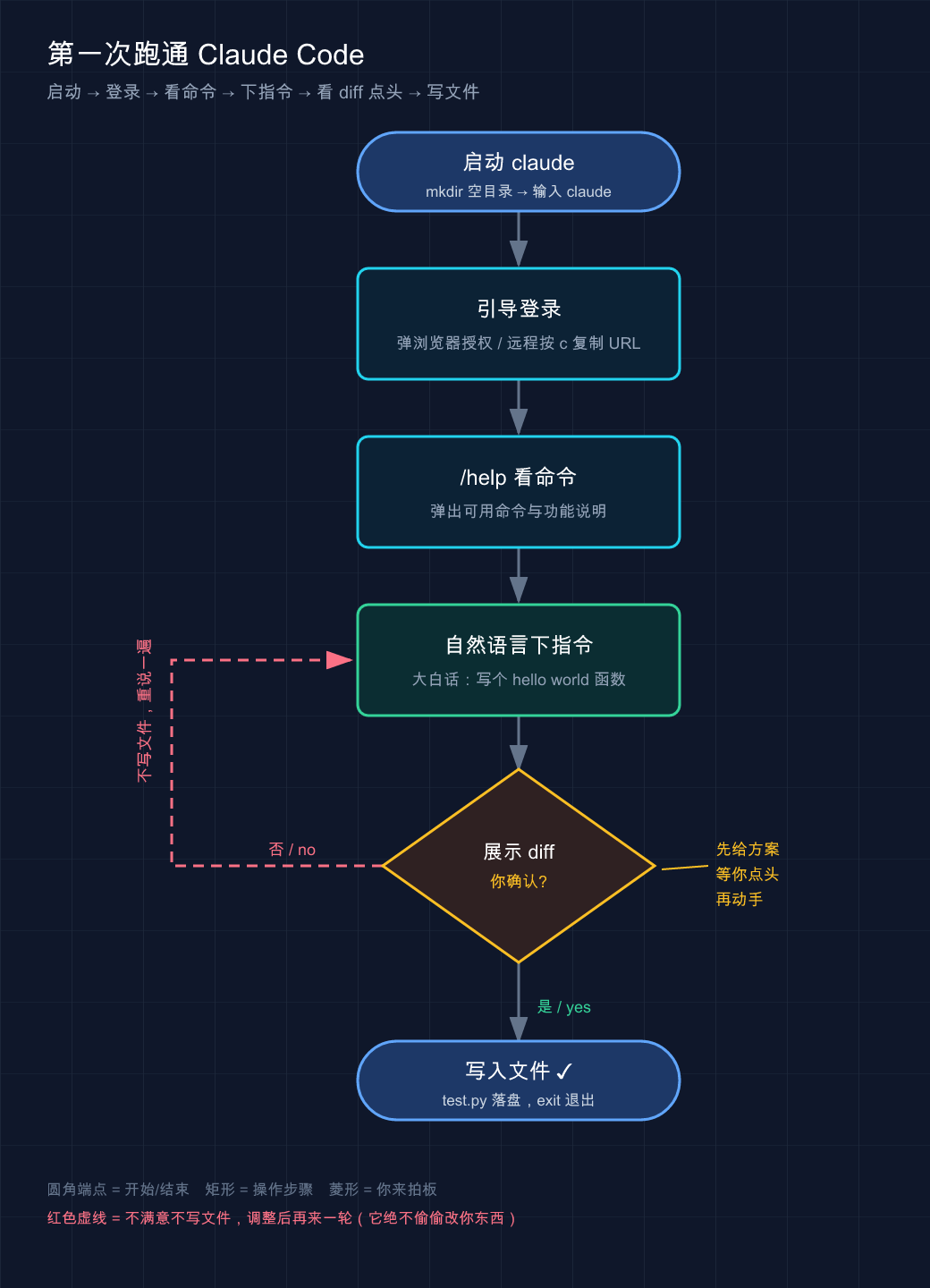
This picture connects the above four steps into a line: from claude startup, logging in, reading commands in /help, giving instructions in vernacular, to the most critical step - it will show you the diff first and wait for you to nod (yes) before writing the file; if you say no (no), it will not write it. After adjustment, it will do another round of **, and it will never secretly change your things during the whole process.
💡 To summarize in one sentence: Create an empty directory and you can run through the entire process -
claudestarts logging in,/helpreads commands, gives instructions in plain English, reads diff and clicks yes, this set of “give a plan first and then start” is its core rhythm.
08 Summary
This article thoroughly goes over “installing and using it”:
- Confirm three things before installation: The system version is sufficient, the account is a paid file or Console, and the usage is CLI.
- Look for the official script: Use
curlfor Mac/Linux/WSL, and distinguish between PowerShell (irm) and CMD for Windows; npm is a bad idea, never usesudo. - Use
claude --versionfor verification, useclaude doctorfor physical examination; check the remainingANTHROPIC_API_KEYfirst to disable the login report organization. - If an error is reported, check the table first to correct the cause: If the command cannot be found, check PATH. If the behavior is strange, check the multiple installations.
You should now be able to independently install Claude Code on your own machine, log in, run through the first example, and know where to look for common errors.
Next article 03 · How Claude Code works - Lift the lid and look inside: How did your sentence “write a hello world function” change from one sentence to a precise file modification? Behind it is a mechanism called “agent loop”. Only if you understand it can you really know how to use Claude Code instead of just typing commands.
Leave a question: When you asked it to write
test.py, did it first look at the files in the directory, or did it write it directly? This difference is the entry point of the next article.
Installing it is just getting the tool, and knowing how to use it is the real skill - see you in the next article.
04 · API configuration: Subscription login or API key, how to choose and switch
In June 2026, Claude Code’s official documentation listed a total of 6 authentication methods, from subscription login to cloud vendor credentials, with priorities one after another.
There is a very common pitfall here, I have fallen into it myself. At that time, I was trying to save trouble. I exported an ANTHROPIC_API_KEY in .zshrc in the early years. Later, I bought a Max subscription and /login and logged in well. However, one day I checked the Console bill and found that the API was continuously deducting money - I obviously thought that I had been using the subscription quota. It took me a long time to figure it out: As long as there is an API key in the environment, its priority will be higher than the subscription.
To put it bluntly, “logging in” does not mean “using the correct identity.” This article will explain the matter thoroughly.
After reading this article, you will get:
- Applicable Scenario Comparison Table of subscription login vs API key two ways, so you know which way you should take
- Three landing postures of “where to configure and how to change” (command line login / environment variables / settings.json), and the differences between Mac / Windows / Linux
- A set of self-checking commands: Use
/statusto confirm “which identity and which model I am using now”, and no longer be charged for confusion.
01 Two identities: subscription login vs API key
Let me give the conclusion first: **For personal use, choose subscription to log in; only use API key if you want to embed script/CI/team and bill based on usage. **
The essence of Claude Code’s model is to answer a question: “Why should I use it?” This is authentication - you have to prove who you are and whose credit you use. There are several ways of official support, but for novices, it is enough to grasp the two most mainstream ways first.
**Analogy: Entering the gym. **Subscribing and logging in is like getting a monthly card-swipe your face to enter, and you can practice as much as you want within a month, and there is no pay-per-view; the API key is like a pay-per-view ticket-one will be deducted every time you enter, and you pay for what you use. The monthly pass is suitable for people who go every day, and the tickets are suitable for people who come once in a while, or bring people in for friends (scripting, automation).
The difference between the two roads can be explained clearly in a table:
| Dimension | Subscription login (Claude.ai account) | API key (Console/environment variable) |
|---|---|---|
| How to connect | Run claude in the terminal and log in with the browser | Configure the ANTHROPIC_API_KEY environment variable |
| How to bill | Monthly subscription (Pro/Max/Team) | Based on token usage, deducted from Console balance |
| Amount | There is an upper limit on the amount of usage, you have to wait for the refresh to reach the limit | You can use as much as you charge, there is no fixed upper limit |
| Who is it suitable for | Personal daily interactive development | Script / CI / Team pay-by-volume settlement |
| Where the credentials come from | /login Browser authorization | Claude Console Create key |
| Can it be used without a browser | A browser is required by default (CI uses setup-token) | Yes, just environment variables |
Let’s break down the subscription a little bit more, because it will be used later when selecting a model:
- Claude Pro / Max: Personal subscription, log in with Claude.ai account. The Pro is lightweight, while the Max is large and can use the most powerful models.
- Claude for Teams/Enterprise: Team package, the administrator invites you, and the billing is unified. Enterprise can also be configured with SSO and hosting policies.
All personal projects must be logged in via Max subscription, so you don’t have to worry about it and don’t need to keep track of your balance. Only when you add automated tasks to GitHub Actions, you can create a separate API key (more on how to play CI in Part 44). **Don’t touch the API key in daily development, it’s just to worry about the deduction for yourself. **
💡 In one sentence: Subscription = monthly card (personal daily), API key = tickets (script/team based on volume), first think about what kind of person you are, and then make allocations.
02 Subscription login: the most worry-free way
If you are an individual user and have purchased Pro or Max, then there is basically no need to configure the configuration - just run it and log in.
**The operation is just one step. ** After installing Claude Code (see 02 for installation), type in the terminal:
claudeWhen launched for the first time, Claude Code will automatically open the browser to allow you to log in to your Claude.ai account. After logging in, the browser will jump back to the terminal, done.
Here are a few situations that we may actually encounter, let me tell you in advance:
- **The browser did not pop up automatically? ** Press
cin the Claude Code interface, it will copy the login link to the clipboard, and you can paste it into the browser to open it yourself. - **After logging in, the browser gave me a string of “login codes”, but it didn’t jump back? ** Paste the code back to the
Paste code here if promptedprompt in the terminal. This situation is common in WSL2, SSH remote sessions, and containers - because the browser cannot connect to the local callback port. - **Want to change account/log out? ** Enter
/logoutin Claude Code and log in again next time.
**Where are the credentials for logging in stored? ** The platform is different in this respect. You will not be blinded if you know how to troubleshoot the problem:
| Platform | Credential storage location |
|---|---|
| macOS | Encrypted system keychain (Keychain) |
| Linux | ~/.claude/.credentials.json (permission 0600) |
| Windows | %USERPROFILE%\.claude\.credentials.json (inherit user directory permissions) |
These are all automatically managed by Claude Code through /login / /logout, you don’t need to touch them manually. When I was troubleshooting the login problem on my Mac, I followed the Linux method and searched for ~/.claude/.credentials.json, but I couldn’t find it. I once suspected that the login was not successful - this is the reason: macOS did not put it into a file at all, but stuffed it into the Keychain.
💡 Summary in one sentence: Subscribers “Run
claude→ Log in with a browser” and everything will work. The Claude Code will be automatically saved, so don’t read it manually.
03 API key: The path between scripts and teams
The API key approach is actually very narrow in scope of application - if you don’t do automation or do volume-based settlement in your team, you won’t be able to use it. ** But since we want to explain clearly “how to switch”, we must first know what it looks like.
**The first step is to get the key. ** Go to Claude Console to create an API key (this is Anthropic’s official developer console, billed based on token usage, and is a separate account from Claude.ai subscription).
**The second step is to configure environment variables. ** The platform commands are different and are mentioned separately:
macOS / Linux:
export ANTHROPIC_API_KEY=sk-ant-你的密钥Windows (PowerShell, permanently writes user environment variables):
[Environment]::SetEnvironmentVariable("ANTHROPIC_API_KEY", "sk-ant-你的密钥", [EnvironmentVariableTarget]::User)⚠️ **The key is money, don’t leave it lying around. ** Do not write the key into the code, submit it to Git, or paste it into any file that will be shared. Temporarily use
exportto set the current terminal to be the most stable. Turn it off and it will disappear. If you want persistence, use system environment variables instead of hardcoding them into the project.
**Step three, start confirmation. ** After setting it up, run claude. In interactive mode, the system will prompt you to approve this key once (choose one of approval/rejection, the choice will be remembered). Once approved, run with it.
Here is a key behavior that is officially stated, which is the root of the pit at the beginning:
**If you have an active Claude subscription, but
ANTHROPIC_API_KEYis also set up in the environment, the API key will take priority after approval. ** If this key belongs to a disabled or expired organization, it will also directly cause verification failure.
In other words, the API key “overrides” your subscription. That’s why we have the switching problem that will be discussed in the next section.
💡 One sentence summary: API key is taken in Console to get the key → configure environment variables → start approval three steps; remember that once it exists, it will take priority over subscription**, which is the root of all subsequent “switching” problems.
04 How to switch: Priority is the truth
**Core conclusion: It doesn’t matter which identity you think you are using, Claude Code’s priority order has the final say. ** If you want to switch, the essence is to change this priority.
**Analogy: The wiring sequence of sockets. ** There are several sockets on the wall of your house (subscription, API key, cloud certificate…). Which one of the appliances draws power from it does not depend on which one you want to use. It depends on which one is actually plugged in and whose position is farther forward. To change the power supply, you have to unplug the one further forward.
The authentication priority given by the official document has 6 levels from high to low (higher ones will override lower ones):
| Priority | Credential source | Typical scenarios |
|---|---|---|
| 1 (highest) | Cloud provider (Bedrock / Vertex / Foundry) | Enterprise cloud vendor |
| 2 | ANTHROPIC_AUTH_TOKEN environment variable | Go to LLM gateway/proxy |
| 3 | ANTHROPIC_API_KEY environment variable | Direct connection to Anthropic API |
| 4 | apiKeyHelper script output | Dynamic/rotating credentials |
| 5 | CLAUDE_CODE_OAUTH_TOKEN | Long-term token used in CI |
| 6 (minimum) | Subscription credentials for /login | Personal subscriptions go to this level by default |
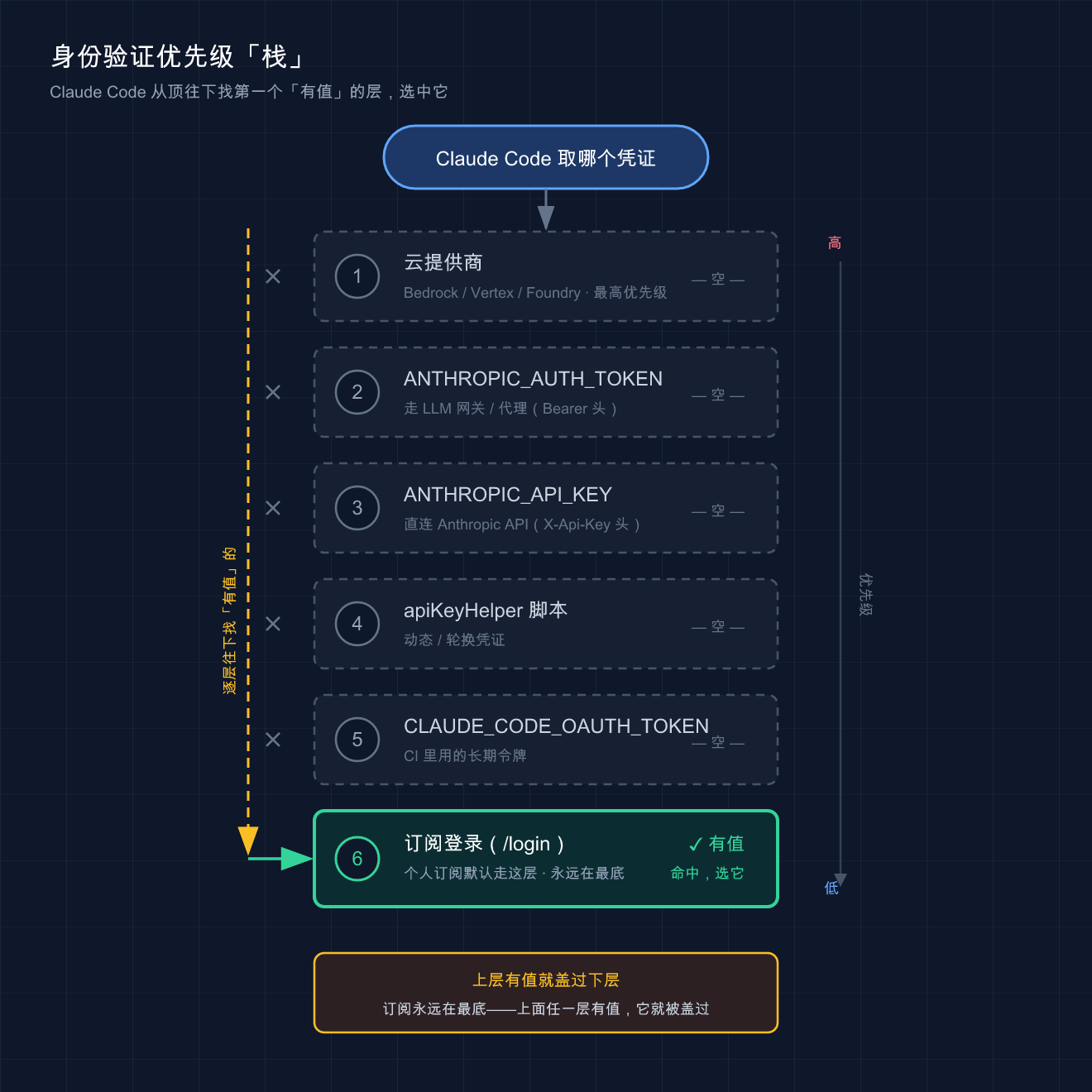
This picture “stands up” the table above: 6 layers of credentials are stacked vertically from high to low. Claude Code scans down from the top of the stack, skipping all “empty” layers, stopping at the first “valuable” layer and using it - in the personal subscription scenario, the upper 5 layers are all empty, so the bottom subscription login is hit.
Do you understand? **Subscription is at the bottom. ** So as long as any layer above has a value, it overrides your subscription. This explains the scene at the beginning - you are clearly logged in to Max, but you are burning API money - because the ANTHROPIC_API_KEY of layer 3 suppresses the subscription of layer 6.
**How to switch back to subscription? ** The official method is very straightforward - clear the higher priority layer:
unset ANTHROPIC_API_KEYThen run /status to confirm. If you don’t want to use a certain key temporarily in interactive mode, you can also turn off the “Use custom API key” switch in /config.
Conversely, to switch from subscription to API key, you just need to add the key to export and approve it once (see Section 03).
Write down a few details that are easy to miss:
ANTHROPIC_API_KEY/ANTHROPIC_AUTH_TOKENonly take effect for terminal CLI sessions. ** Claude Desktop desktop and remote sessions only recognize OAuth login** and do not read these environment variables.- Claude Code on the Web (web version) always uses your subscription credentials, and the API key environment variable in the sandbox cannot override it.
ANTHROPIC_AUTH_TOKEN(layer 2) andANTHROPIC_API_KEY(layer 3) are two different things: the former is sent as theAuthorization: Bearerheader and is used when going through a gateway/proxy; the latter is sent as theX-Api-Keyheader and is used when connecting directly to the official API. **Do not mix. **
💡 In one sentence: switch = adjust priority. Subscription is at the bottom, and any value in the upper layer will overwrite it; to switch back to subscription,
unsetremove the higher-level one, and then use/statusto verify.
05 Basics of model selection: opus, sonnet or default
After the identity is matched, there is one more thing to decide: Which model should it be used to work on? **
**Analogy: assigning jobs and selecting people. ** Opus is the strongest senior engineer in the team—good brain, deep reasoning, but slow and expensive; Sonnet is the main force-daily programming is fast, stable, and cost-effective; Haiku is the errand boy-simple tasks can be completed in seconds and the most economical. Opus is the difficult person, Sonnet is the everyday person, and Haiku is the chore person.
Claude Code uses model alias so you don’t have to remember a long list of version numbers. These are commonly used:
| Alias | Purpose |
|---|---|
default | Special value: clear manual override and return to the recommended model at your account level |
opus | Latest Opus, complex reasoning/architectural decisions |
sonnet | The latest Sonnet, daily programming |
haiku | Fast and efficient, handle simple tasks |
best | Currently equivalent to opus, using the most powerful model available |
opusplan | Mixed mode: Plan Mode uses Opus to think, and switches to Sonnet when executing |
opus[1m] / sonnet[1m] | With 1 million token context window, large code base / long session |
Note: The alias points to the “recommended version for your tier” and will be updated over time. For the specific version it is resolved to, the official document shall prevail - for example, on the Anthropic API, opus is currently resolved to Opus 4.8, and sonnet is resolved to Sonnet 4.6, but different providers (Bedrock / Vertex, etc.) resolve different versions (subject to the official document, which may change).
The level of your subscription determines which model is given to you by default:
| Account type | default resolves to |
|---|---|
| Max / Team Premium / Enterprise / Anthropic API | Opus 4.8 |
| Pro / Team Standard / Enterprise subscription seats | Sonnet 4.6 |
In other words, Pro users can use Sonnet by default, and Max users can use Opus by default. This is one of the reasons why heavy users are recommended to use Max. In addition, when the Opus usage threshold is reached, Claude Code may automatically fall back to Sonnet. This is normal behavior and not a bug.
**How to set up the model? ** The official gives four methods according to priority:
# 1. 会话期间临时切(运行不带参数的 /model 会打开选择器)——优先级最高
/model sonnet

# 2. 启动时指定
claude --model opus

# 3. 环境变量(本会话生效)
ANTHROPIC_MODEL=opus
// 4. 写进 settings.json,永久作为新会话默认——优先级最低
{
"model": "opus"
}The above are arranged in order of priority: In-session /model > At startup --model > Environment variable ANTHROPIC_MODEL > settings file. A practical habit: fix sonnet in settings.json every day. When encountering architectural problems that need to be solved, temporarily add /model opus in the dialog to save credit.
The details about workload level (
/effort, controlling the depth of thinking) andopusplanwill not be discussed here - choosing the right model is enough for novices. If you need to dig deeper, check the official “Model Configuration” document.
💡 Summary in one sentence: Problem
opus, dailysonnet, choreshaiku;defaultdepends on your subscription level, Pro defaults to Sonnet, and Max defaults to Opus.
06 Hands-on: 3 minutes to confirm “Who am I using”
Just not watching it means not watching it. By running the following set of commands, you can thoroughly understand your current identity and model status. **The whole process is done in the terminal and then in the Claude Code interface, without relying on any complex environment. **
**Step one: Enter Claude Code. ** Find any directory and run:
claude**Step 2: Check the current status. ** Type in the Claude Code input box:
/statusIt will display your account information and currently valid authentication method/model. Expect to see something similar (specific fields vary with version, subject to actual display):
Account: your@email.com (Max)
Auth: Claude subscription (OAuth)
Model: opus (Opus 4.8)
If Auth here shows an API key and you think you are using a subscription - congratulations, you have just caught the pit mentioned at the beginning.
**Step 3: See which models can be used/cut them. ** Input:
/modelA model selector will pop up, listing opus / sonnet / haiku and other options. Select up or down and press Enter to confirm. If you want to cut it directly:
/model sonnet**Step 4 (optional): Verify the priority of “subscription vs API key”. ** This step allows you to see with your own eyes the rules discussed in Section 04. Exit Claude Code first, in the terminal:
# 看看环境里有没有 API key 在「偷偷」盖过你的订阅
echo $ANTHROPIC_API_KEY- If a string of
sk-ant-...is output: it means that it is pressing your subscription. If you want to return to subscription, justunset ANTHROPIC_API_KEY, then enterclaudeand run/statusto check again.Authshould be changed back to subscription. - If the output is empty: You are already subscribing (or other credentials with higher priority), no problem.
Use Windows (PowerShell) to check environment variables:
echo $env:ANTHROPIC_API_KEYAcceptance criteria: You can use /status to tell at a glance “Whether I am using subscription or API key, and which model I am running”, and you can manually switch back to subscription through unset + review. If you do this, the core goal of this article will be achieved.
07 Summary
This article explains one thing clearly: **What identity does Claude Code use to connect the model, and how to select and cut this identity. **
| Your situation | How to configure | Default model |
|---|---|---|
| Personal Pro/Max | Run claude → Browser /login | Pro→Sonnet, Max→Opus |
| Script / CI / Team based on volume | Console to get the key → configure ANTHROPIC_API_KEY | See specific settings |
| Want to switch back to subscription | unset ANTHROPIC_API_KEY + /status Review | — |
Three most important points to remember:
- Subscription is at the bottom of the priority, and any API key/token in the environment will override it - check this first if you are charged for an inexplicable fee.
/statusis your magic mirror: If you don’t know who is using it, knock it.- Models are selected by job: difficult
opus, dailysonnet,defaultand subscription levels.
You should now be able to: log in correctly after installation, understand which identity and model you are using, switch back and forth between subscription and API key, and no longer be fooled by the “application fee is deducted despite clearly logging in to the subscription” situation.
Next article preview
What you have connected here is still Claude’s official model. But Claude is used in China, and the official API is not very friendly - can Claude Code be allowed to run domestic models such as DeepSeek, Tongyi Qianwen, and GLM? **
Can. The secret lies in the environment variable that appears repeatedly in this article but has never been expanded upon - ANTHROPIC_BASE_URL: it does not change “which model to use”, only “where the request is sent”. Next article 05 · Connect to third-party/domestic models, use it to connect Claude Code to domestic large models, save money and don’t need magic Internet access.
Let me leave you with a little thought: Since the API key will override the subscription, if you point ANTHROPIC_BASE_URL to the domestic platform and add the corresponding key, will Claude Code “change the core”? See you in the next article.
After taking the “main road” of official models, in the next article we turn to the “fork in the road” of domestic models.
05 · Access third-party/domestic models
Use domestic/third-party models such as DeepSeek to drive Claude Code and cut down the bill
⚠️ A precautionary shot at the beginning of this article: using third-party models to drive Claude Code is an “experimental gameplay”. The official documentation only officially covers “LLM Gateway” and managed Claude such as Bedrock/Vertex, and does not endorse any non-Anthropic models. I have marked the source of everything officially written in this article (the meaning of environment variables, default behavior); the DeepSeek part is mainly based on community solutions and actual testing. The interface address and model name may change at any time, and the official DeepSeek shall prevail.
Brothers, let me first say something that may get you scolded: Most people don’t need to mess with third-party models at all.
A bunch of tutorials on the Internet promote “Claude Code and DeepSeek” as a money-saving tool, making it seem like you will be taken advantage of if you don’t take it. But to be honest - if you have already bought a Claude subscription (Pro/Max), or the monthly API cost is only a few dozen yuan, the money you save by spending half a day is not enough for you to debug environment variables.
Then why write this article? Because there are two types of people who can really use it: One is heavy users with burning API balances who transfer tens of millions of tokens in and out every day. They can save hundreds or thousands a month by switching to a model that is ten times cheaper; the other is domestic users who cannot connect to the official website and do not want to use magic to access the Internet. DeepSeek, a domestic direct connection interface, is the most worry-free.
It’s these two kinds of people – look down. If not, just take a quick look at the principle and don’t rush to change it.
After reading this article, you will get:
- A comparison table of “official API vs third-party models”, first think about whether you should change
- A set of DeepSeek access configurations that you can copy and run (provided separately for Mac / Windows)
- Understand what the four key environment variables are doing, and they are applicable to any third-party model.
- Several common pitfalls: deprecated variables,
/statusverification, and when not to use it
01 First understand: What exactly is changed when changing the model?
Let’s talk about the conclusion first: **Claude Code is the “shell” and the model is the “brain”. What third-party access does is to replace the brain with someone else’s. **
The Claude Code you installed is essentially a client running in the terminal - it is responsible for reading your code, adjusting tools, managing context, and running the agent loop of “think → do → see”. But it doesn’t think by itself. At every step, it sends a request to a large model and waits for the model to reply. By default this model is Anthropic’s Claude.
**Analogy: A car with a new engine. ** Claude Code is the car shell - the steering wheel, seats, and instrument panel remain unchanged, and your operating habits do not need to change at all. The model is the engine. The original engine (Claude) is the most powerful but expensive in fuel costs; if you want to save money, you can remove it and plug in a domestic engine (DeepSeek). The car is still the same car, it feels the same when driving, but the power and fuel consumption have changed.
So how to “replace the engine” specifically? It does not rely on changing the code, but a few environment variables. The most core one is called ANTHROPIC_BASE_URL - it determines the address to which Claude Code sends the request.
Here is a point that is emphasized in the official documentation but not explained clearly in 90% of the tutorials:
**
ANTHROPIC_BASE_URLchanges where requests are sent, not which model answers them. **(Official “Model Configuration” original text)
What does it mean? ANTHROPIC_BASE_URL only changes “where to send the letter” and is not responsible for “who replies to the letter”. You change the address to DeepSeek’s interface. Whether DeepSeek is willing to accept it and which model to use is determined by the interface address + model name. So just changing the URL is not enough, the model name must also be matched - this is a high-risk area for pitfalls later, so remember it first.
So why can DeepSeek directly connect? Because **DeepSeek provides an interface “compatible with the Anthropic protocol” - the address is https://api.deepseek.com/anthropic. To put it bluntly, DeepSeek disguised itself as Anthropic, making Claude Code think it was still talking to the official. In fact, DeepSeek was behind the scenes. **Claude Code There is no need to change a single line of source code. **
💡 Summary in one sentence: Change the model = change a few environment variables to replace the “engine”, the car shell (Claude Code) does not move;
ANTHROPIC_BASE_URLcontrols “where to send it”, and the model name controls “who will answer”, Both of them must be matched.
02 Should I change it? Look at this table first
Before taking action, calm down for five minutes. **Third party models are not a free lunch, it saves money but also throws something away. **
I compared it with a real project for two weeks: the same set of code, the same work, using the official Sonnet one week, and switching to DeepSeek the next week. The table below is the most realistic feeling after actual use, not a copy of the parameter table.
| Dimensions | Official Claude (Anthropic API) | Third-party/domestic models (such as DeepSeek) |
|---|---|---|
| Price | Expensive, Opus is especially expensive | ✅ Cheap, often an order of magnitude cheaper |
| Domestic direct connection | Most require magic to access the Internet | ✅ DeepSeek and other domestic direct connections, zero threshold |
| Code Ability | ✅ Currently in the first echelon, complex reconstruction is stable | Sufficient, complex tasks occasionally overturn |
| Tool call/Agent capability | ✅ Native is the most stable, and multi-step tasks will not drop the chain | ⚠️ Look at the model, the compatible interface may occasionally have marginal behavior |
| Configuration Cost | Just fill in a Key | Configure a set of environment variables, easy to get into trouble |
| Official Support | ✅ First Class Citizen | ❌ Experimental, no one will tell you if something goes wrong |
Do you understand? **Cheap and domestic direct connection are the two trump cards of third parties; the price is code limit, Agent stability and “no one knows the truth”. **
The real conclusion from the comparison in the past two weeks: **DeepSeek is completely sufficient for daily additions, deletions, modifications, tests, documentation, and code explanations. The feel is not much different from Sonnet, but it costs less than a fraction. ** But once it comes to the task of “understanding the calling relationships of five or six files and major cross-module reconstruction”, DeepSeek missed key dependencies twice, and Claude gave the same prompt once.
Therefore, the more practical usage is to mix it up: give the rough work to the cheap model, and switch back to Claude for the hard work - specifically how to layer it, Section 05 gives a set of configurations that can be copied directly.
One sentence to determine whether it should be changed:
- ✅ It’s time to change: Heavy users with API bills of hundreds or thousands a month; domestic users who are struggling to connect to the official website and don’t want to use magic to access the Internet; people who just want to practice and don’t care about the model gap.
- ❌ Don’t bother: Those who have already purchased a Claude subscription (the subscription is a fixed fee, and changing the API will cost additional money, as detailed in the next article 06); those who mainly work on complex architectures and difficult debugging (the money saved is not worth the exchange for the quality of the results).
Still hesitating? Let the network speak first
In the above list of “Should I change it?”, “Does it take effort to connect to the official website in China?” is the most difficult item to judge by yourself - you thought that turning on the magic and surfing the Internet would be stable, but after running two steps, the Claude Code suddenly showed 502 or 400. Is it because it has a problem or your network is controlled by the risk? Just guessing is useless, run the test first:
ipcheck is a small network environment diagnosis tool I wrote before. After testing IP / DNS / proxy / risk control with one command, it will directly tell you whether the current network can be cleanly connected to the official API.
- Measured all red/yellow (DNS pollution, proxy identification, risk control hits) → Don’t hesitate, a third party can take action, saving you the next N times of metaphysical troubleshooting
- The measured result is all green→ It’s honest and practical, official, don’t bother with a set of environment variables just to save some money.
💡 Summary in one sentence: The third-party model replaces “saving money + domestic direct connection” with “code cap + cover”; Heavy users and domestic direct connection parties should change, and subscription parties and hard-core reconstruction parties should not join in the fun.
03 Hands-on: Connect DeepSeek to Claude Code
Okay, assuming you confirm that you want to change. This section gives a set of configurations that can be run by just copying them.
Let’s use DeepSeek as an example (the most worry-free in China). To connect other third-party models (Kimi, Zhipu, various aggregation transfer stations…) the routine is exactly the same, except that
ANTHROPIC_BASE_URLand the model name are replaced with those of the corresponding platform - these two are subject to their respective official documents.
Prerequisite: Get a DeepSeek API Key
The premise is that you have installed Claude Code (if you have not installed it, go back and see 02 · Installation and Use). Then:
- Open DeepSeek Open Platform, register/log in
- Create an API Key, copy it and save it (in the form of
sk-xxxxxxxx)
🔑 API Key is equal to the wallet key of your account. Don’t submit it to the Git repository, don’t post it in the group, and don’t write it into the code. Next we use environment variables to control it, naturally without entering the code.
Step 1: Configure environment variables
Environment variables are “a set of switches and addresses written to the system”. Claude Code will read them when it starts to decide where to send and what model to use.
**Analogy: Fill in the express delivery form. ** ANTHROPIC_BASE_URL is the delivery address, ANTHROPIC_AUTH_TOKEN is your ID card (it will be sent only after verification of identity), and the following string ANTHROPIC_*_MODEL is “specify which courier to use for delivery.” Only by filling out the form correctly can the package (your request) go to the right place and be processed by the right person.
Mac / Linux
Open a terminal and execute line by line (replace <your DeepSeek API Key> with a real Key):
export ANTHROPIC_BASE_URL=https://api.deepseek.com/anthropic
export ANTHROPIC_AUTH_TOKEN=<你的 DeepSeek API Key>
export ANTHROPIC_MODEL=deepseek-chat
export ANTHROPIC_DEFAULT_OPUS_MODEL=deepseek-chat
export ANTHROPIC_DEFAULT_SONNET_MODEL=deepseek-chat
export ANTHROPIC_DEFAULT_HAIKU_MODEL=deepseek-chat
Windows(PowerShell)
$env:ANTHROPIC_BASE_URL="https://api.deepseek.com/anthropic"
$env:ANTHROPIC_AUTH_TOKEN="<你的 DeepSeek API Key>"
$env:ANTHROPIC_MODEL="deepseek-chat"
$env:ANTHROPIC_DEFAULT_OPUS_MODEL="deepseek-chat"
$env:ANTHROPIC_DEFAULT_SONNET_MODEL="deepseek-chat"
$env:ANTHROPIC_DEFAULT_HAIKU_MODEL="deepseek-chat"
⚠️ About the model name: The
deepseek-chatwritten above is an example placeholder. The specific model name of DeepSeek (and which capability level it corresponds to) is subject to the DeepSeek official document. The name will change when the platform is upgraded, so don’t stick to it. The model name is “the courier number filled in the courier order”. If you fill it in incorrectly, the system will not recognize it and will report an error when it is started.
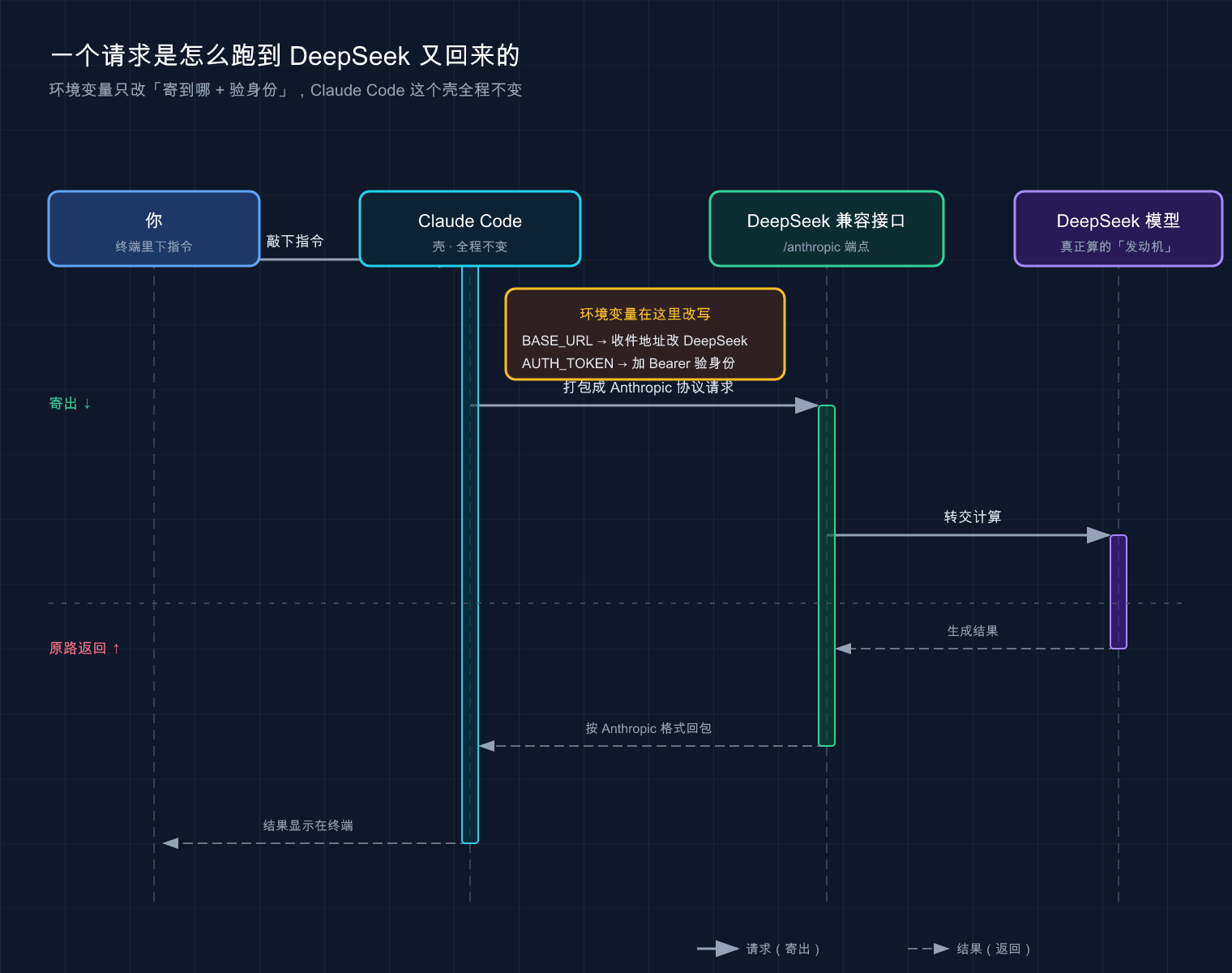
The entire link that the above picture wants to express: Your command → Claude Code is packaged into a request → BASE_URL Change the recipient address to DeepSeek → AUTH_TOKEN Verify identity → DeepSeek model calculation → Return the result to the terminal. **The “shell” of Claude Code in the middle has not changed throughout. **
Step 2: Make the configuration permanent (optional but strongly recommended)
The above export / $env: are only valid in the current terminal window, and will disappear when the window is closed - this is the first big pitfall for novices: “I have obviously configured it, why does it not work after reopening the terminal?”
To make it permanent:
- Mac (zsh, default): Append those lines of
exportto the end of~/.zshrc, and then executesource ~/.zshrc - Linux (bash): Append to the end of
~/.bashrcand executesource ~/.bashrc - Windows: Add user variables in “System Properties → Environment Variables”, or write them into PowerShell’s
$PROFILE
💡 One sentence summary: Connect DeepSeek = get Key + configure a set of environment variables (address + ID card + model name); Temporary export will become invalid when the window is closed. If you want to use it for a long time, write it into
~/.zshrc.
04 Verification: Whether it was connected or not
Don’t rush to use it after configuration, verify first. If you start without verification, you will probably find out after writing for a long time that the request is actually still going through the official process and has not been processed at all - a waste of time.
Verification is just a command. Enter any project directory, start Claude Code, and enter /status:
cd /path/to/your-project
claude
After entering, type in the dialog box:
/statusIf connected, you’ll see lines like this in the output (focus on the Base URL and model):
Base URL: https://api.deepseek.com/anthropic
Model: deepseek-chat
**Seeing that the Base URL has changed to the address of DeepSeek, it means that the “engine” has really been replaced. ** /status will also display your account information and current model, which is the fastest way to troubleshoot this kind of problem - the official document also specifically mentions it to “verify whether your proxy and gateway configuration are applied correctly”.
If the official address is still displayed, or an error is reported directly, check these high-frequency reasons one by one:
| Phenomenon | Most likely cause | How to fix |
|---|---|---|
| The Base URL is still official | The environment variable does not take effect (maybe a new terminal has been opened) | Re-source`, or confirm that it is written into the configuration file |
| It reports that the model does not exist when it is started | The model name is written incorrectly / the platform has been renamed | Go to the official DeepSeek documentation to check the latest model name |
| 401 / Authentication failed | The API Key is wrong or expired | Regenerate the Key and check if there are any duplicate spaces |
| Prompt to log in to claude.ai | The client also wants to log in officially | See instructions below |
The last one is a separate statement: In some third-party access scenarios, the official login prompt will pop up when Claude Code is started. A common method is to change ~/.claude.json and add a line "hasCompletedOnboarding": true to skip booting. This is an experimental bypass and is not a standard practice recorded in official documents. The behavior of the new version may change - it will not move if it can be moved. If it is really stuck, try again.
💡 Summary in one sentence:
/statusTake a look at the Base URL to see if it has changed, and you will know whether it has been connected; If you cannot connect, don’t guess, just follow the checklist item by item.
05 Advanced: Use models in layers to save money without losing chain.
This section is the most valuable move, and it is also the concrete implementation of the “mixed use” mentioned in Section 02.
Remember that bunch of ANTHROPIC_*_MODEL variables in Section 01? They are not filled in randomly - Claude Code internally divides the tasks into three levels, and you can assign different models to each level.
| Variable | Official meaning | What kind of work is suitable for |
|---|---|---|
ANTHROPIC_DEFAULT_OPUS_MODEL | The model resolved by the opus alias | The most complex: architecture design, troubleshooting |
ANTHROPIC_DEFAULT_SONNET_MODEL | The model resolved by sonnet alias | Daily: writing functions and changing code |
ANTHROPIC_DEFAULT_HAIKU_MODEL | haiku alias / model for background functions (such as automatic title, etc.) | Lightweight: quick Q&A, background chores |
CLAUDE_CODE_SUBAGENT_MODEL | Model used by all sub-agents/agent teams | Sub-tasks, it is recommended to give them the cheapest and fastest ones |
All the above meanings come from the official “Model Configuration” document. This mechanism is not exclusive to DeepSeek, but is native to Claude Code - when connecting to a third party, you just point these aliases to the third-party model.
**Analogy: restaurant scheduling. ** The chef (the strongest model) has a high salary and only lets him cook the signature hard dishes; leave the home-cooked stir-fry to the ordinary chef (mid-range model); serve tea, pour water and wash vegetables (backstage chores, sub-tasks) and send an apprentice (cheap and fast model). **Does the whole store use chefs? The food is delicious, but you can’t afford the salary. **
Therefore, the really good way to play is not to “fill in one model”, but to layer - assuming that a certain platform has two models: “strong reasoning model” and “fast and cheap model”:
# 复杂任务用强的
export ANTHROPIC_DEFAULT_OPUS_MODEL=<强推理款模型名>
export ANTHROPIC_DEFAULT_SONNET_MODEL=<强推理款模型名>
# 轻量任务和子代理用便宜快的,省钱
export ANTHROPIC_DEFAULT_HAIKU_MODEL=<快而便宜款模型名>
export CLAUDE_CODE_SUBAGENT_MODEL=<快而便宜款模型名>
The advantage of this configuration: when you use /model opus in Claude Code to switch to “heavy range”, you will run the strong model. Normally, the cheaper model will be run by default. High-frequency background calls such as sub-agents will automatically run the cheapest model - the bill will come down immediately.
There is also a variable that controls “thinking depth” CLAUDE_CODE_EFFORT_LEVEL, which officially supports low / medium / high / xhigh / max / auto (auto means restoring the model’s default gear; which gears are available depends on the model). If you want the model to think longer and the results to be more stable, you can adjust it higher; if you want to save tokens and go faster, you can adjust it lower.
An easy-to-use combination: Fill the default gear with a cheap model + effort for
mediumfor daily running. If you encounter a problem, use/modelto manually switch to a heavy gear + temporarily pull it tohigh. After using this method for a month, the API bill is reduced to about one-third of the original amount, and the daily experience is almost the same.
💡 Summary in one sentence: Don’t fill all the gears into one model - Give rough work to the cheap, hard work to the strong, and sub-agents go to the cheapest. After stratification, you can save money and quality at the same time.
06 Two pitfalls that novices must step into
Finally, I will mention two common pitfalls that novices will fall into, and talk about them specifically.
Pitfall 1: Copied variable names that have been officially deprecated
On the Internet (including in the “reference configuration” table of some tutorials) you will see a variable ANTHROPIC_SMALL_FAST_MODEL, which is used to specify the “fast small model”.
This variable has been officially marked “deprecated”, and the correct owner is ANTHROPIC_DEFAULT_HAIKU_MODEL. Many people followed the old tutorial and copied ANTHROPIC_SMALL_FAST_MODEL when they configured it for the first time. Although it could still run at the time, they were still unsure - if you look through the official “Environment Variables” document, you will find that it has been replaced.
Conclusion: Always use ANTHROPIC_DEFAULT_HAIKU_MODEL for new configurations. If you see ANTHROPIC_SMALL_FAST_MODEL in the old tutorial, just replace it. Don’t keep it.
Pitfall 2: Can’t distinguish between AUTH_TOKEN and API_KEY
When connecting to a third-party model, which variable is used for authentication? The two look alike, but behave completely differently - just look at the official statement:
| Variables | Official actions | Who should be used to connect third parties |
|---|---|---|
ANTHROPIC_AUTH_TOKEN | Sent as Authorization header, the value is automatically prefixed with Bearer | ✅ Connect to third parties such as DeepSeek to use this |
ANTHROPIC_API_KEY | Sent as X-Api-Key header; in non-interactive mode (-p), it is forced to be used as long as it exists | Used when using the official Anthropic API |
Why does the third party recommend ANTHROPIC_AUTH_TOKEN? Because compatible interfaces such as DeepSeek use the standard Authorization: Bearer <key> set, it is just right. This is also the reason why ANTHROPIC_AUTH_TOKEN is used in both community plans and actual tests.
There is also a related pitfall that you should be aware of: the official documentation clearly states that when ANTHROPIC_BASE_URL points to a “non-first-party host” (that is, an unofficial address), the MCP tool search will be turned off by default**. To put it simply - after connecting with a third party, some advanced features that rely on official functions may behave differently or even be unavailable. This also echoes the phrase “experimental, no one knows” in Section 02. It is not used much in daily programming, but if you rely heavily on MCP, you must have this string in mind.
💡 One sentence summary: Look for
ANTHROPIC_AUTH_TOKENfor authentication, andANTHROPIC_DEFAULT_HAIKU_MODELfor small models; The deprecated variables in the old tutorial will be replaced directly, and some advanced features from third parties will be reduced.
07 Summary
This article does one thing: **Change the “brain” of Claude Code from the official Claude to a cheaper third-party model. **
Let’s list the key points:
| Links | Key actions |
|---|---|
| Think clearly | Heavy users / Domestic direct-connected parties are worth changing, don’t bother subscribing to the party |
| Continued | With ANTHROPIC_BASE_URL + ANTHROPIC_AUTH_TOKEN + model name |
| Verification | /status Check whether the Base URL has changed |
| Saving in place | Hierarchical filling model, rough work is cheap, hard work is strong, and sub-agents are the cheapest |
| Avoid pitfalls | Don’t use the deprecated ANTHROPIC_SMALL_FAST_MODEL; use AUTH_TOKEN for authentication |
You should now be able to: **Independently connect DeepSeek (or any third-party model compatible with the Anthropic protocol) to Claude Code, verify the connection, and configure it hierarchically by task to keep the bill down. **
Let me reiterate the anti-consensus statement: This is a way to save money, not a required course. Whether it’s worth the trouble depends on whether you are really worried about the API bill - most light users are just fine if they just use the official version.
Next article 06 · Coding Plan: Subscription packages and billing - Since this article has been talking about “saving money”, let’s do the calculation to the end: **Claude’s subscription package (Pro / Max) or pay-as-you-go API, which one is more cost-effective? ** Let me leave you with a question: If you use Claude Code heavily every day, should you buy a subscription, or is it cheaper to connect to a third-party API? You will have the answer after reading the next article.
06 · Coding Plan: Subscription packages and billing
There is a number in the official document that is easy to be stunned when you first see it: In enterprise deployment, Each developer burns an average of about US$13 per active day and US$150-250 per month (Source: official costs document). 13 US dollars a day, according to the exchange rate, is more than 90 yuan, less than 2,000 US dollars a month - this is just the “average”.
When I first used Claude Code to connect to the official API (pay-as-you-go), I suffered a loss: I didn’t install any usage reminders, so I just worked on it for a week. I opened the Console over the weekend and looked at the bill. It was just over $40** - it wasn’t a lot of money, but I couldn’t tell how it was spent: Which conversation burned more? Did you choose the wrong model or is the context stack too full? A confusing account.
In this article, let’s settle the account clearly. Clearly understanding the billing logic is much more important than blindly looking for cheap packages - The same package will last for a month for those who know how to use it, and will reach its peak in three days for those who don’t.
After reading this article, you will get:
- A comparison table of “Pay-as-you-go vs. Subscription Package vs. Domestic Coding Plan” to know which path you should choose
- Understand the billing unit (token) of Claude Code and know where the money is spent.
- With a few commands (
/usageto check usage,/usage-creditsto set upper limit,/statusto configure core), you can keep an eye on your expenses. - A set of practical and effective money-saving habits, for the same work, tokens can save a lot of money
01 First figure out: what are you paying for?
Let’s talk about the conclusion first: Claude Code itself is free, you pay for the “model computing power”.
Claude Code is just a command line tool that runs in the terminal. It is free to download. What really costs money is the big model behind it - when you ask questions, it reads files, and it writes code, the content is sent to the model for processing. This processing amount is the billing unit.
**Analogy: Claude Code is the taxi and the model is the mileage. ** It’s free to get on the bus, and you’ll be given a ride in the car for free, but once you start driving, the meter will jump for every kilometer you run. The more you ask, the bigger the file it reads, and the longer it thinks about it, the longer the “mileage” will be.
The unit of measurement for this “mileage” is called token. **Analogy: token is the “priced word count” of text. ** The model cuts the text into small pieces for counting - according to Anthropic’s official [Platform Glossary] (https://platform.claude.com/docs/zh-CN/about-claude/glossary), For Claude, 1 token represents approximately 3.5 English characters, and the exact number varies by language (Chinese does not give a fixed ratio); what you send out is counted as “input token”, and what it comes back is counted as “output token”, which are priced separately, and output is usually more expensive.
Let’s take a few scenarios that you encounter every day and feel how tokens stack up:
- Let it “read this 2000-line file and then change it” - The entire file becomes an input token and is sent out
- A round of conversation reaches item 50 - The previous 49 items are resent each time as context (this is the big head, the
/clearhabit in Section 05 is for this) - With extended thinking turned on, it “thinks” for a long time before taking action - The thinking process counts as the output token
Therefore, the amount of money spent has little to do with “how many questions are asked” and has a great relationship with “how much context is inserted each time” - this is the core starting point for saving money later.
💡 In one sentence: the tool is free, you pay the computing power fee calculated by token for the model - input + output + thinking, all count.
02 How to choose between the three options: Pay-as-you-go/Official Subscription/Domestic Coding Plan
Now that you know how to pay for tokens, the next question is: **What channel is used to pay this money? ** There are three mainstream approaches, first go to the table and then talk about people.
| Plan | How to charge | Monthly cost (reference) | Who is it suitable for | Main pitfalls |
|---|---|---|---|---|
| Official pay-as-you-go (API/Console) | Deduct according to token usage and use | Floating, heavy users $150–250+ | Want to use the official native model, usage is stable | Bills are floating, may exceed budget; need to bind card (USD) |
| Official Subscription (Pro/Max/Team) | Fixed monthly fee, including a certain amount | Fixed (subject to official pricing) | High-frequency use, if you want fixed expenditure, use the official model | Overseas payment, magic Internet is required; the amount has an upper limit |
| Domestic Coding Plan (Ark/Bailian/iFlytek, etc.) | Fixed monthly fee, multi-tool sharing quota | Low, There are often promotions in the first month | Domestic users, cost-sensitive, able to accept domestic models | Models are not Claude; quota is based on manufacturer’s rules; prices are variable |
**These three paths are not “which one is best”, but “who you are”. **Two points to add to the table:
Official two paths - Pay-as-you-go native Claude model (the first echelon of programming), the most flexible but the bill fluctuates (that stupid $40 earlier is it); subscription has the least psychological burden, and Max is suitable for heavy users, but requires overseas payment + magic Internet access, and how much it costs** will always be based on the official claude.com/pricing**, I won’t spell it out here.
Domestic Coding Plan is the most practical choice for domestic developers now. Volcano Ark, Alibaba Bailian, and iFlytek have all launched “Coding Plan” - a subscription service specifically designed for AI programming tools, with a fixed monthly fee, much lower than pay-as-you-go billing, and compatible with Claude Code**. It integrates Qianwen, Kimi, GLM, DeepSeek, Doubao, and MiniMax, and multiple tools (Cursor, Cline, etc.) share a share**.
⚠️ Domestic Coding Plan price promotions are extremely frequent. It is said on the Internet that “9.9 / 49.9 for the first month” is an active price for a certain period of time. It may change at any time and the event may be removed from the shelves. This article does not quote specific amounts, please go directly to the manufacturer’s event page to see the current price.
The access method (Base URL, ANTHROPIC_MODEL) has been thoroughly explained in the previous article and will not be repeated. But there is a big billing pitfall that must be dealt with separately, which will be discussed in the next section.
💡 Summary in one sentence: Official native choose subscription or pay-as-you-go, domestically save money and choose Coding Plan - first think about who you are, then choose a path, don’t just look at the price.
03 Billing Pitfalls of Domestic Coding Plan: Wrong Base URL selection, money is wasted
I picked it out separately because too many people are in trouble here - they obviously bought the Coding Plan, but received an extra bill at the end of the month. The root cause is: **The same manufacturer often has two sets of Base URLs, one for package quota and one for pay-as-you-go, which look very similar to **. Take Volcano Ark as an example:
| Base URL | Which money to take | Purpose |
|---|---|---|
https://ark.cn-beijing.volces.com/api/coding | ✅ Consumption of Coding Plan package quota | Use this to receive Claude Code |
https://ark.cn-beijing.volces.com/api/v3 | ❌ No package, separate payment based on volume | Ordinary API call |
Did you see it? Only one word is missing: coding and v3. You bought a package and thought that the fixed monthly fee would be capped. However, when configuring it, you filled in /api/v3 with a shake of your hand. The package quota has not changed at all. All calls are billed on a pay-as-you-go basis and you pay extra at the end of the month. Alibaba Bailian is similar - its Coding Plan exclusive key (starting with sk-sp-) and the pay-as-you-go common key (starting with sk-) are not interoperable, and the same problems arise when they are mixed.
Therefore, when accepting the domestic Coding Plan, remember two iron rules: Base URL must contain the word coding; API Key should be the one exclusive to the package, and do not use the pay-as-you-go Key. The specific addresses and Key prefixes of Ark and Bailian above are private rules of third-party manufacturers and will change with adjustments by manufacturers. Please refer to the current instructions of each manufacturer’s official documents/console before proceeding.
Once you enter v3 by mistake when configuring Volcano Ark, if you habitually run /usage that night to check the usage, you will find that “the package quota has not changed, but the amount in the Console is there instead”, and you quickly change it back to coding. **This kind of pitfall is difficult to detect by checking the configuration with the naked eye. It can only be caught by observing the usage. **
💡 Summary in one sentence: Buy a package ≠ Use the package - **Base URL selects the one with
codingand the key is exclusive to the package. Check it immediately after matching, otherwise the money will quietly flow away through another hole.
04 How to check usage: three commands to keep an eye on your wallet
Just paying without checking the usage is equivalent to driving while blindfolded. Claude Code has several built-in commands to let you know where your money is spent at any time, let’s talk about them one by one.
/usage: The most comprehensive usage panel (the one used most frequently)
Type directly in the dialog box:
/usageThe Session block at the top of it displays the detailed token usage of the current session, which looks like this (source: official costs documentation):
Total cost:            $0.55
Total duration (API):  6m 19.7s
Total duration (wall): 6h 33m 10.2s
Total code changes:    0 lines added, 0 lines removed
The four lines are: estimated total cost, actual API processing time, actual duration of the hanging window, and number of lines of code changed. **After completing a task, tap it casually to get an idea of the current expenses. ** But there is an important official reminder:
The dollar figure in the Session block is a local estimate from the token number and may differ from the actual bill. **For authoritative billing, please see the usage page of Claude Console. **(Source: official costs documentation)
If you use Official Pro/Max/Team/Enterprise subscription, /usage will also have one more Quota Usage Details - the recent consumption is divided into skills, subagents, plugins, and each MCP server to display the proportion. Press d / w to switch to “past 24 hours / 7 days”. Note that this is an approximation calculated from local session history and does not include usage from other devices or claude.ai. (Source: official costs documentation)
/usage-credits: Set a monthly limit for yourself (a tool to prevent overspending)
This is an official Pro/Max plan exclusive feature (source: official costs document):
/usage-creditsIt allows you to set a monthly spending limit on your usage limit. Once you spend this amount, Claude Code will prompt you to “increase the limit or remove the limit” and decide directly in the CLI. Changing this limit requires the account’s billing access (billing access).
Newbies are strongly advised to use it to set an upper limit as soon as they start - for example, if you budget 100 yuan a month and stop you when it reaches the top, it is much better than being shocked when you look at the bill at the end of the month. My confused $40 was precisely because I didn’t know there was such an order at the time.
There is also /status, open the Status tab of the setting interface, and display version, model, account, connectivity (version, model, account, connectivity) according to the official commands document. The official recommendation in Third Party Integration Documentation is to “use /status to verify whether your proxy and gateway configurations are correctly applied” - It is the tool used to check the access configuration in the previous section. After configuring the package, click it and confirm that the model and connectivity are normal before starting work.
| Command | Applicable scenarios | Precautions |
|---|---|---|
/usage | Check the current session token usage and estimated cost | The amount is a local estimate, see the Console for the authoritative bill |
/usage-credits | Set monthly usage caps and prevent overspending | Only available on official Pro/Max plans |
/status | Check version, model, account, connectivity | The first step to verify whether the access configuration is effective |
💡 In one sentence:
/usagelooks at the details,/usage-creditssets the upper limit,/statuscore configuration - Three commands will weld the wallet to death.
05 The real skill of saving money: Let the same work burn less tokens
Changing to a cheaper package is the worst option, but knowing how to use the tools is the best option**. Back to the sentence in Section 01 - How much money you spend is extremely related to how much context you put in, so the key to saving money is: Don’t let the model read useless things and make unnecessary detours. The following are all from the official costs document, and I have selected the most immediate ones for novices.
**First, use /clear to clear between tasks. ** This is the most rewarding habit.
/clearI used to have a window open from morning to night. I fixed bugs in the morning and wrote new features in the afternoon, all squeezed into one session. I was too lazy to save time. The problem is context accumulation: for every question in the afternoon, the pile of useless conversations in the morning is re-sent, and the tokens are doubled in vain. Later, when I looked at /usage, I found that the unit price of the conversations in the afternoon was obviously higher than that in the morning. This is how they were burned. Official words:
Use
/clearto start over when switching to unrelated work. A stale context wastes tokens on every subsequent message.
Develop a habit: /clear` immediately after completing an independent task, and never hard-redirect unrelated tasks in the old session. Just this time, a large chunk of long session overhead is cut off.
**Second, choose the right model, don’t use a cannon to kill mosquitoes. ** The official principle is “Sonnet handles most programming tasks well and costs less than Opus, leaving Opus for complex architectures and multi-step reasoning” (source: costs document). Speaking in human terms: ** Sonnet is completely adequate for daily code modification, function writing, and bug fixing; only those with hard skills like “reconstructing the entire module” can use /model to cut Opus. Simpler subagent tasks can even specify Haiku in the subagent configuration, at a lower unit price. By default, Sonnet is installed, and only cuts two or three times a week.
**Third, use plan mode first for complex tasks. ** Press Shift+Tab to enter and let it explore the code base and propose a plan for your approval before proceeding - Rework in the wrong direction is the most expensive. This pitfall is very common: when asked to change an unspecified requirement, it immersed itself in changing seven or eight files, all in the wrong direction, and all this token was wasted.
**Fourth, prompt to write specific points. ** The more vague you are, the more it will search through files all over the world to guess what you want to do. Each file you turn through is a token. Comparison of the official words: “Improve this code base” to trigger extensive scanning, “add input verification to the login function of auth.ts” to make it work efficiently with minimal file reading.
The following table can be used as a “money-saving quick check” posted next to the monitor:
| Bad habits ❌ | Good habits ✅ | Where to save |
|---|---|---|
| A session is used from morning to night | /clear between tasks | Do not resend stale context |
| Fully linked to Opus | Default is Sonnet, solving difficult problems with Opus | Lower unit price |
| Start working on vague requirements directly | Plan mode for complex tasks first | Less rework and less messy scanning |
| ”Help me improve the code" | "Add input verification to the login function of auth.ts” | Read less irrelevant files |
Trivia (source: official costs document): Claude Code also uses a little token when he is free - such as summarizing old conversations in the background for claude --resume. But the amount is small, usually less than $0.04 per session, so don’t worry.
💡 To sum up in one sentence: Saving money is not about changing to a cheaper package, but
/clearbeing diligent and clear, Sonnet knowing everything, planning before complex things, and clarifying the prompts - the smaller the context, the thinner the bill.
06 Do it: Keep an eye on your spending this week in three steps
Just not watching it means not watching it. You can run the following set of actions now and establish “usage awareness” in five minutes.
Prerequisite: The Claude Code has been installed and configured according to the previous articles (official subscription or domestic Coding Plan is acceptable). Start in the project directory:
cd path/to/your_project
claude
**Step one: Check that the configuration is correct. **
/statusIt will open the Status tab of the setting interface and display version, model, account, connectivity (version, model, account, connectivity) according to the official commands document - focus on confirming that the model is the one you want to use and the connectivity is normal, otherwise it means that the access is not paired.
The Base URL itself is not in the output of /status. You have to go back and check the environment variables you wrote: Domestic Coding Plan users** confirm that ANTHROPIC_BASE_URL has the word coding** (such as .../api/coding), and is not a pay-as-you-go address such as /api/v3. If you make a mistake, go back to the set of environment variables in Chapter 05 and correct it, then reopen the terminal and start again.
**Step 2: Ask a random question to see how much it cost. ** Let it do some small work first:
帮我看看当前目录下有哪些文件,简单说下这个项目是干嘛的When it finishes replying, type:
/usageThe top Session block is expected to look like this:
Total cost:            $0.0X
Total duration (API):  Xs
Total duration (wall): Xs
Total code changes:    0 lines added, 0 lines removed
Remember this number. **This is the cost of “asking a simple question + reading the table of contents” - with a baseline, you can tell at a glance which conversations will cost you money in the future.
**Step 3: Set a monthly cap (official Pro/Max users). **
/usage-creditsFollow the prompts to set an upper limit you are comfortable with. After setting it to the top, it will actively stop you and ask if you want to increase it, which is equivalent to putting a safety catch on your wallet.
Domestic Coding Plan users:
/usage-creditsis for the official usage quota and may not be applicable to your manufacturer package - the quota and usage are subject to the manufacturer’s console**, but/usageand/clearstill need to be developed.
After completing these three steps, you will upgrade from “burning money” to “knowing how much you have burned at any time and setting up gates.”
💡 In one sentence:
/statusNuclear port →/usageBuild benchmark →/usage-creditsSet upper limit and get back control of spending in five minutes.
07 Summary
This article breaks down the “money” of Claude Code and talks about it.
| What You Learned | Key Points |
|---|---|
| Why pay | The tool is free, but you pay the computing power fee calculated by token for the model |
| How to choose among the three paths | Official native→Subscription/pay-as-you-go; Domestic savings→Coding Plan |
| The Pitfalls of Domestic Packages | Select the Base URL with coding, and use the exclusive Key |
| How to check usage | /usage View details, /usage-credits set upper limit, /status core configuration |
| How to save money | /clear Qinqing, Sonnet knows everything, plan the complicated first, and explain clearly with tips |
Just remember one thing: How much you spend is extremely related to “how much context you put in”, not “how many questions you asked”. If you understand this sentence thoroughly, you can deduce the tricks to save money by yourself - understand the billing logic, find out the current expenses, set a monthly limit, and work more economically, you have won it all here.
⚠️ Again, I emphasize the accuracy: the package prices, promotions, and quota rules involved in this article will change, and the amounts are always subject to the official claude.com/pricing or domestic manufacturer activity pages; command behaviors such as /usage-credits are subject to the official costs document, which may be updated with the version (claude --version See version).
The calculation is clear, the package is selected, the next article 07 “First use: Run through the first example” - Claude Code is officially launched, starting from a smallest real project, and running the agent cycle of “think → do → see” by myself. **Enough foreshadowing, it’s time to get serious. **